
Ask Mato is an AI chat assistant built into the dashboard. It's aware of which screen you're on, whether that's a show, an episode, your episode list, or a settings page, and tailors what it suggests accordingly.
Ask Mato is still rolling out and may not be available on every account yet. Where it is available, here's how it works.
Opening it
Press ⌘J (Mac) or Ctrl+J (Windows and Linux) from most screens, or click the Ask Mato pill at the bottom of the window. It expands into a chat panel. On Home, use the main composer box instead of a separate launcher; Ask Mato lives there. Esc minimizes the panel, and New conversation starts fresh.
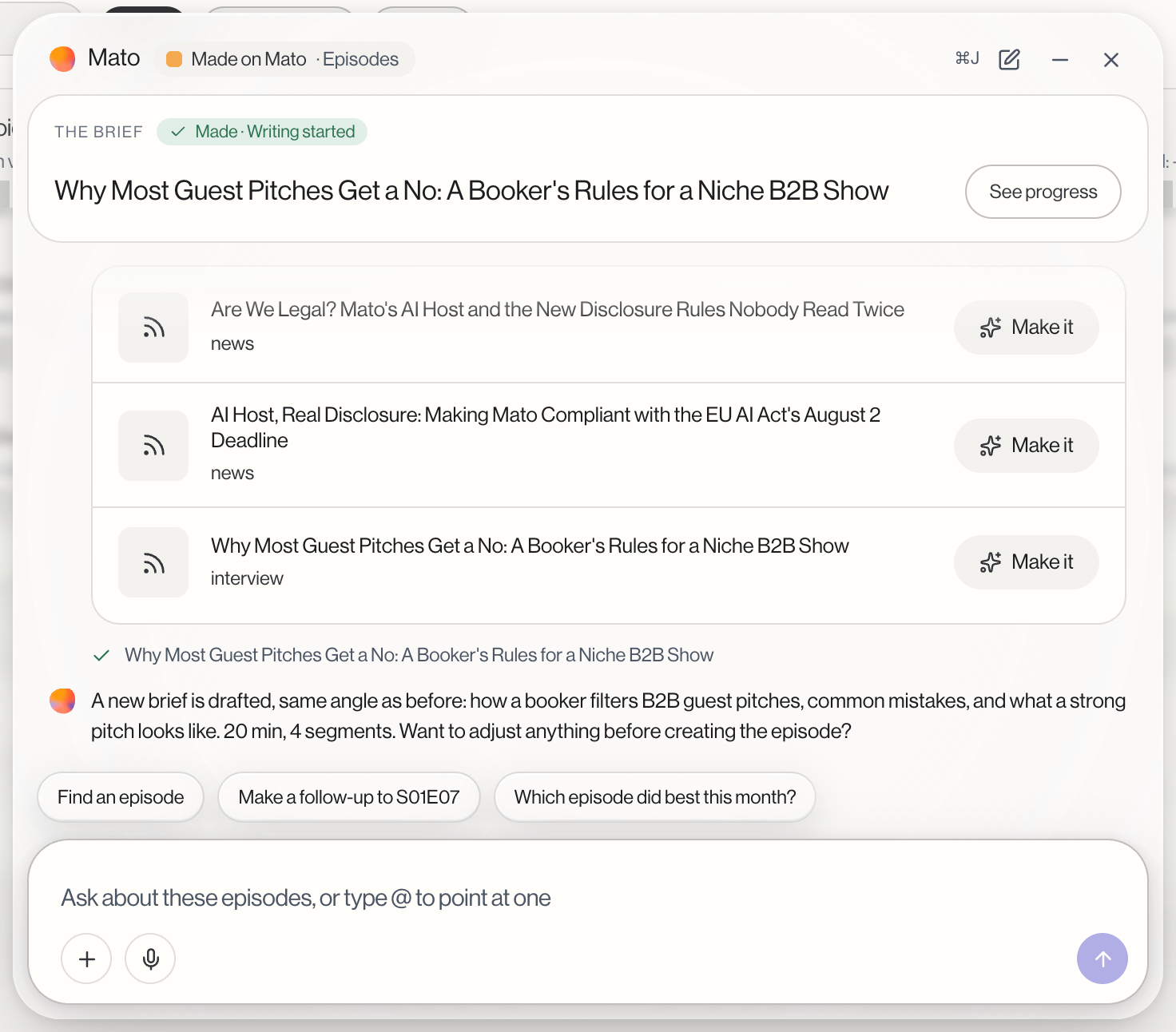
Type @ in the message box to point at a specific show, episode, or guest, the same way you would in the Home composer.
What it can help with
Ask Mato reads and shows information without asking permission first:
- Find and list episodes, shows, interview invites, or content ideas, each shown as a card linking back to the real page.
- Show a live "brief" as you talk through a new episode idea, including a title, angle, and outline, which you can open in the full wizard or have Mato create directly.
- Jump you to a specific page: Billing, Members, Security, Distribution, Hosts, Content sources, Interviews, Clips, Content, or Episodes.
- Suggest what to ask next, as quick-reply buttons based on where you are.
What always needs your confirmation
Anything that changes something in your account is a separate category. Inviting a guest, cutting social clips, proposing article ideas from an episode, scheduling an idea, changing your publish schedule, changing show settings, and creating an episode all show up as a card marked Needs your OK.
Nothing happens until you click Confirm. There's no auto-confirm and no timeout that carries an action out on its own. If an action needs more detail than you've given in chat, Ask Mato opens the real form instead of one-tap confirming, pre-filled with what you've already discussed.
Limits
Ask Mato has a daily and per-minute message limit per person. If you hit either, it tells you how long to wait, or that the daily limit resets at midnight UTC. Some actions also depend on your plan or your remaining monthly episode allowance; if one is blocked, Ask Mato shows you what's blocking it rather than failing silently.
Related guides
See Start from Home for the composer's own prompt-to-episode flow, and Get help for the Help panel, which can also hand a question to Ask Mato.